I used GATE to draw my Bangkok apartment. Now it controls my whole home.
One chat and zero lines of code: lamps that glow, an even temperature and happy plants.
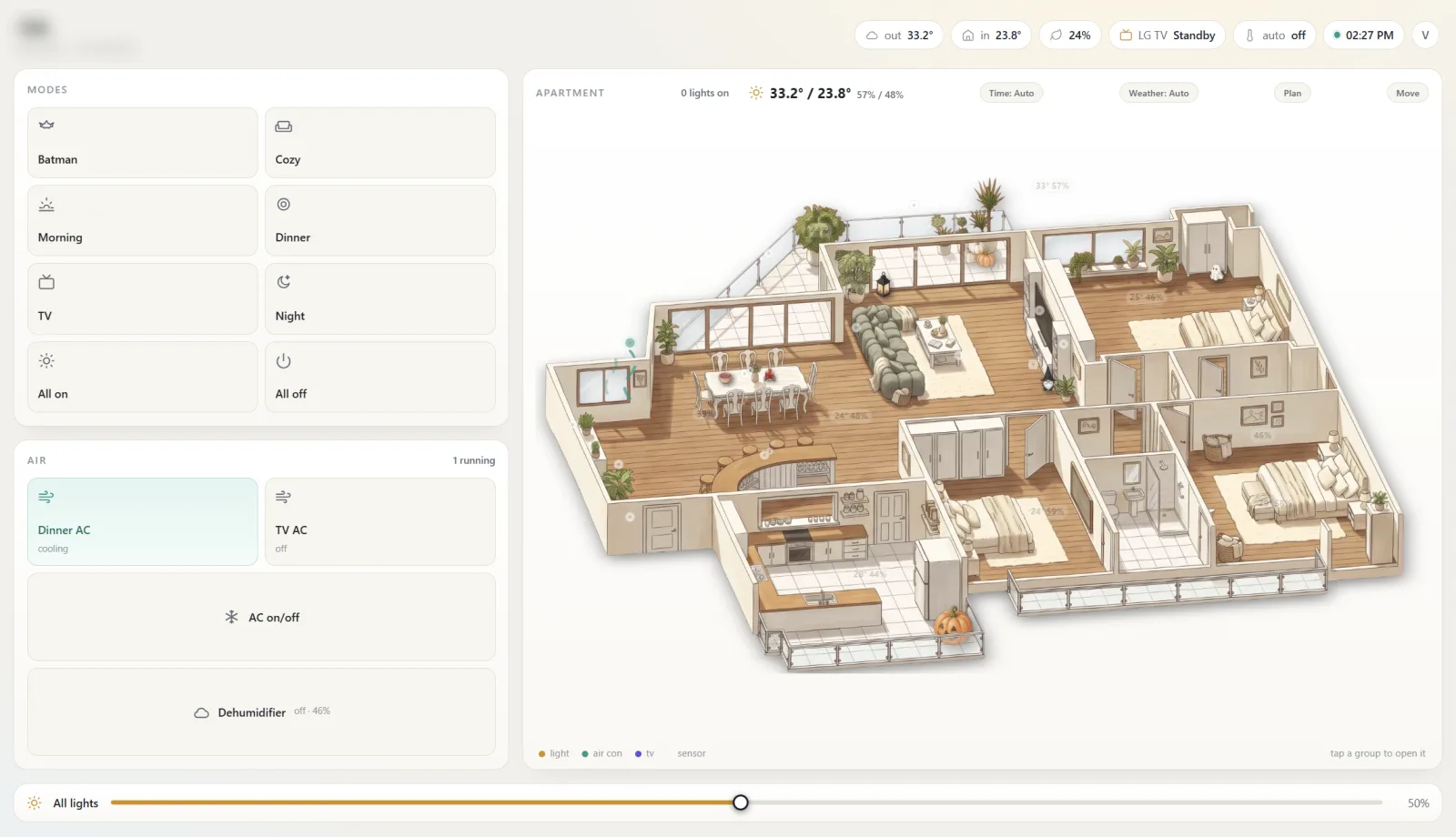
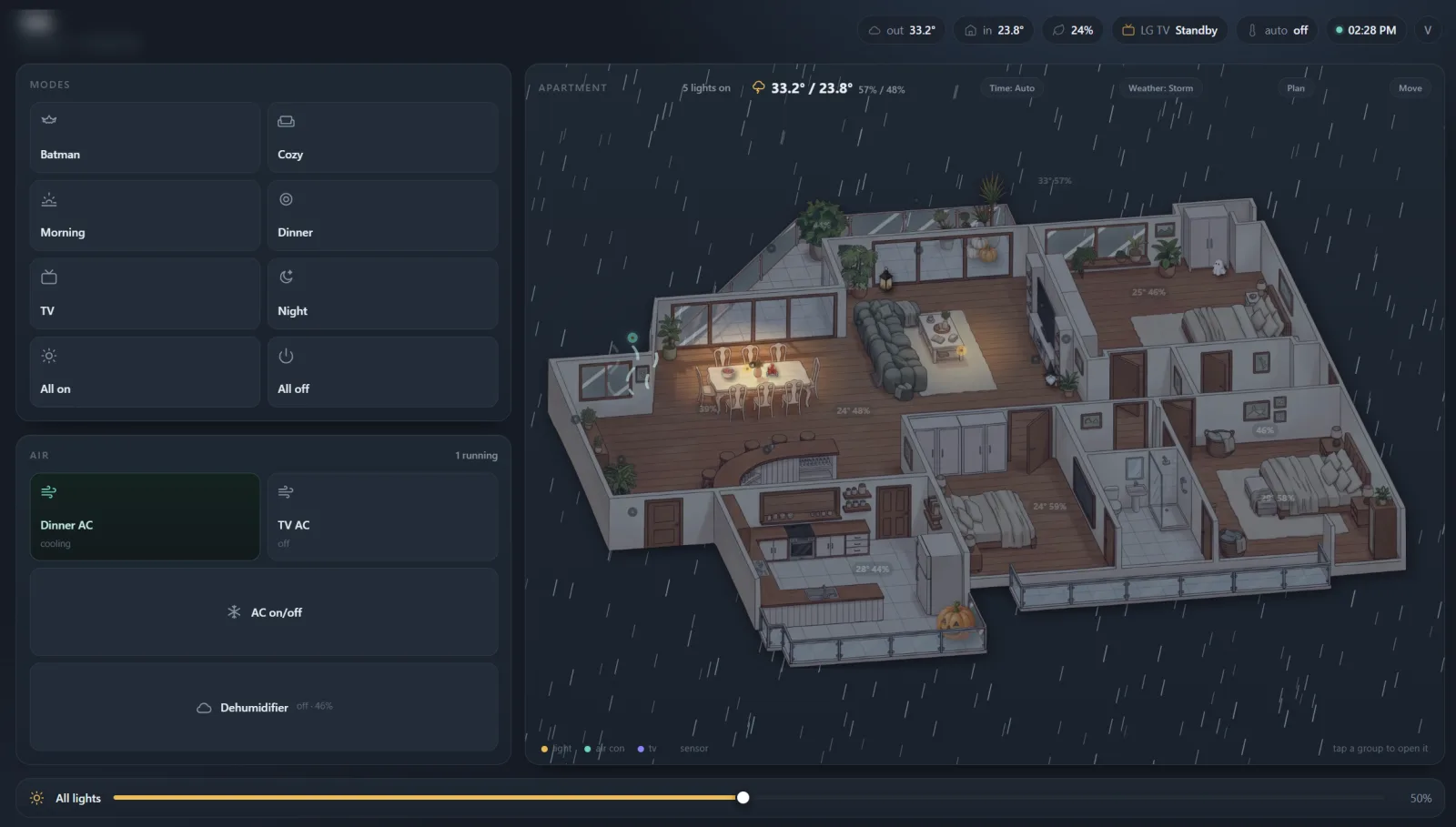
It is evening in Bangkok. On my phone the apartment is drawn like a cozy video game: the living room lamps throw warm pools of light across the wood floor, the AC by the dinner table puffs little lines of air, outside the glass it is raining, and a jack-o’-lantern sits on the balcony, half hidden behind the railing. When I turn a lamp off in the app, that corner of the drawing goes dark.
I designed every part of it and did not write a line of code. I directed the whole build in one chat with Molly, the AI assistant that runs on GATE, the platform we build at Gate Intelligence.
Now it also runs the home. Molly and GATE keep the temperature even: when the air gets too warm or too humid, the air conditioners start on their own, and they stop when the room is back where I want it. Four plants have soil sensors and email me when they are thirsty or drowning. This is how it all came together, step by step, including the parts that went wrong.
It started with a dimmer
In our rental in Thonglor, the first problem was small: a 30 metre LED strip in the ceiling cove that could only be on or very on.
Before buying anything I wanted to know what the strip actually draws. Molly read the driver label from my photo: 6.6 W per metre, about 200 W in total, too much for the 150 W smart dimmer I had found. So I ran a cheap experiment first, a 108 baht inline dimmer. It worked, and it told me the rest of the plan was worth doing.
Next came IKEA Zigbee spotlights and the DIRIGERA hub. I made one rule for every purchase after that: it has to speak Matter, or it has to work with Home Assistant out of the box. A Matter plug works with the IKEA hub. A cheap Tuya Zigbee plug does not.
Lesson: read the product page and the integration docs before you buy. That rule caught that the cheap Reolink cameras need an extra hub for Home Assistant, while the Outdoor model does not.
Home Assistant on a Raspberry Pi
Then I set the real goal: “If we run Home Assistant, we can build our own app inside GATE: every light, every sensor, the cameras, one place.”
We shopped together. GATE has a browser tool that lets the assistant work in a real browser tab while I watch, so Molly searched Lazada, checked delivery dates and filled the cart to my spec: a Raspberry Pi 5 in a fanless case (silence was non-negotiable), a Zigbee stick, temperature sensors, a soil sensor for the Monstera, and Broadlink IR blasters for our five air conditioners.
When the Pi arrived I set it up with Claude on my laptop, using setup prompts generated in the chat. Home Assistant came up on the local network, the Pi got a fixed address on the router, and a Cloudflare tunnel gave GATE a secure way in from outside, with the token kept in GATE’s vault instead of in the chat.
From that point the apartment answered to plain language:
- “Set every lamp to 50 percent, it’s evening.”
- “Lights off, then both air conditioners off.”
- “Movie mode: TV on, lights down to 30 percent, all at the same moment.”
The air conditioners have no network, only an IR remote. So we taught them: the Broadlink listens, I press a button on the remote, and the code is saved. One temperature and fan speed at a time. The first “power” code turned out to be an on, not a toggle. You only learn that by testing every button.
From mockup to a real app
I wanted to see the apartment, not a list of switches, so I asked for a floor plan with a dot for every device. It worked, and I decided it had to be a real product, not a demo page with a token in it.
That became GATE Homie: a private repo, a small server that holds the Home Assistant token, a PIN for each family member, built for the phone first. The code was written in a GATE code session, an AI developer working in its own copy of the repo and opening pull requests. Because my family would use it, I required an independent security review before anything went live. It paid off: the first version would have let any family PIN call any Home Assistant service, including restarting the box. Fixed before launch.
Lesson: “it works” and “it’s safe to give your family” are two different reviews.
Then it grew, one decision at a time:
- Modes: Batman (10 percent, one dinner spot at 50), Cozy, Dinner, Morning, Night, All on, All off. My favourite trick: set the room exactly how you like it and say “save this as Cozy”.
- Climate: every sensor in the header, history graphs, hover for exact values.
- Sensors reflashed to Zigbee, a second IR blaster and an iPhone app (PWA).
Keeping the temperature even
Bangkok is hot and humid all year, and the AC remote used to live in my hand. Now Molly and GATE keep the temperature even. Molly wrote the Auto AC rule into Home Assistant, and I set its numbers in Homie:
- Too warm: both air conditioners cool, in the mode I picked for each. Cold delight is 16 degrees on a low fan: the room cools fast and the ACs switch off sooner.
- Too humid, but not warm: they switch to dry mode.
- Back to normal: they turn off only when the temperature and the humidity are both under their off points.
The gap between the on and off numbers is what keeps it even: the room stays inside it, and the ACs never flap on and off around a single number. I choose which of the five indoor sensors count, and whether one is enough or all of them must agree. The rule checks every minute, day and night, whether anyone has the app open or not, and it remembers what it last sent, so it never beeps at an AC that is already off.
When something still feels wrong, I ask Molly. One night the bedroom reached 72 percent humidity and I asked her if the AC was broken. She read the sensor history: the room sat just under the AC’s set temperature, so the compressor hardly ran and nothing dried the air. After that the Auto AC got a humidity setting and a dry mode, and the bedroom got a dehumidifier that switches itself on when the air gets too damp.
Keeping the plants happy
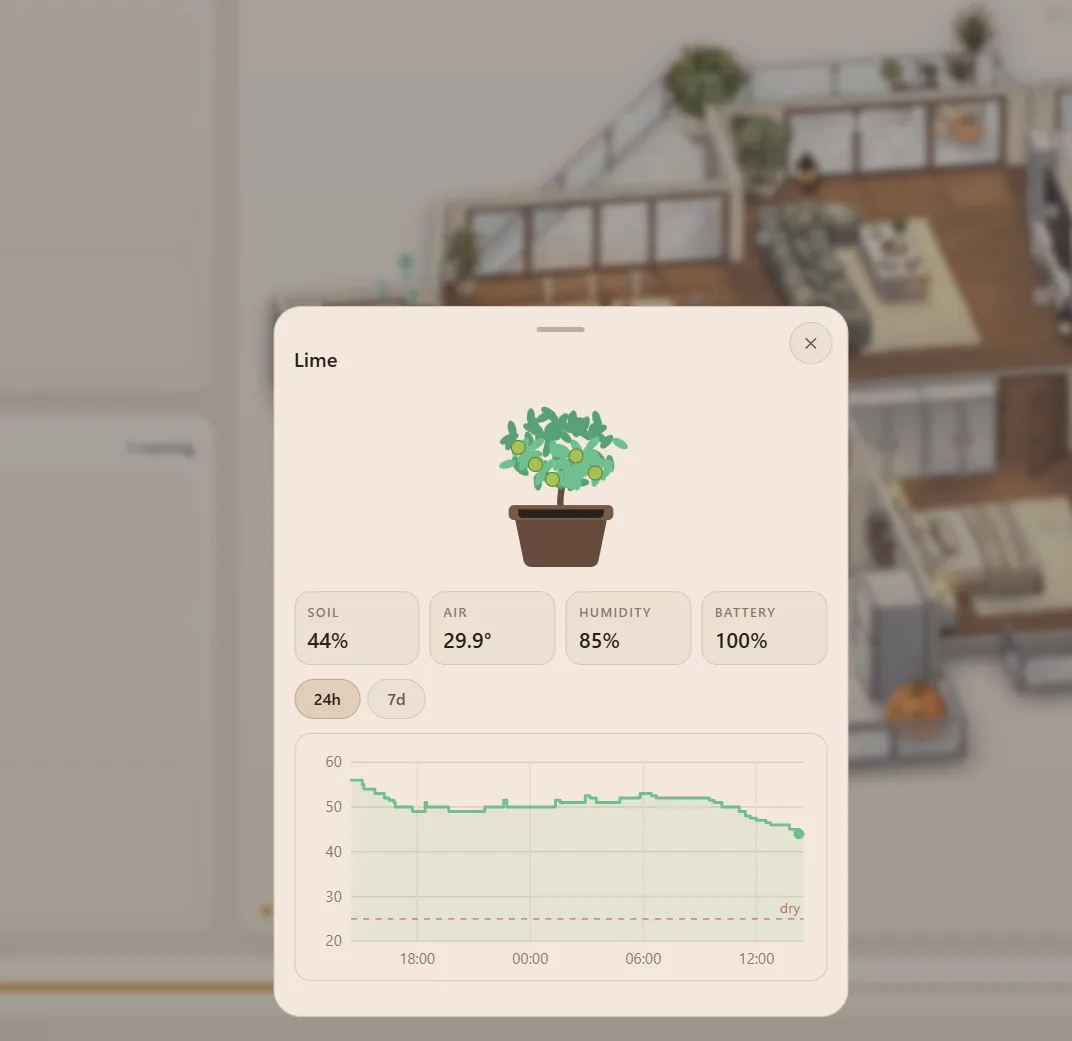
Four plants have a soil sensor in the pot: the Monstera, the lime on the balcony, an areca palm and a mok. Each has its own line for too dry and too wet. For the lime, Molly looked up what too wet means: over 70 percent for two whole days, because a fresh watering reads high for hours.
The lime is also why the plants write to me: it once stood in water for days. Now every plant has its own email address and writes to me itself when it gets too dry, too wet or is fine again. “Mano: I’m drowning” arrives from mano@ my own domain. Homie reads a sudden jump in the soil reading as a watering, so every email also says when the plant last got water. In the app a thirsty plant shows red and a drowning one violet.
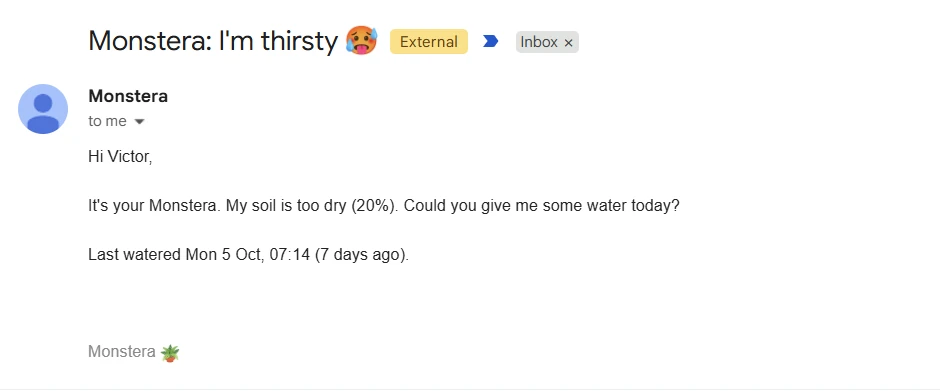
I still do the watering. GATE tells me which plant, and when.
Drawing the apartment
I wanted the dashboard to look like the apartment, drawn in the style of a cozy video game. This was the hardest part, and the most fun.
The first AI drawings had the right mood and the wrong apartment: a balcony floating in the air, the kitchen twice, my coloured marks painted onto the walls as decoration. We tried cut-out furniture placed on an empty room (everything looked pasted), whole-room furnishing with the best image model (it moved walls like they were suggestions), and region-by-region edits.
The method that finally worked came from treating it like a production pipeline:
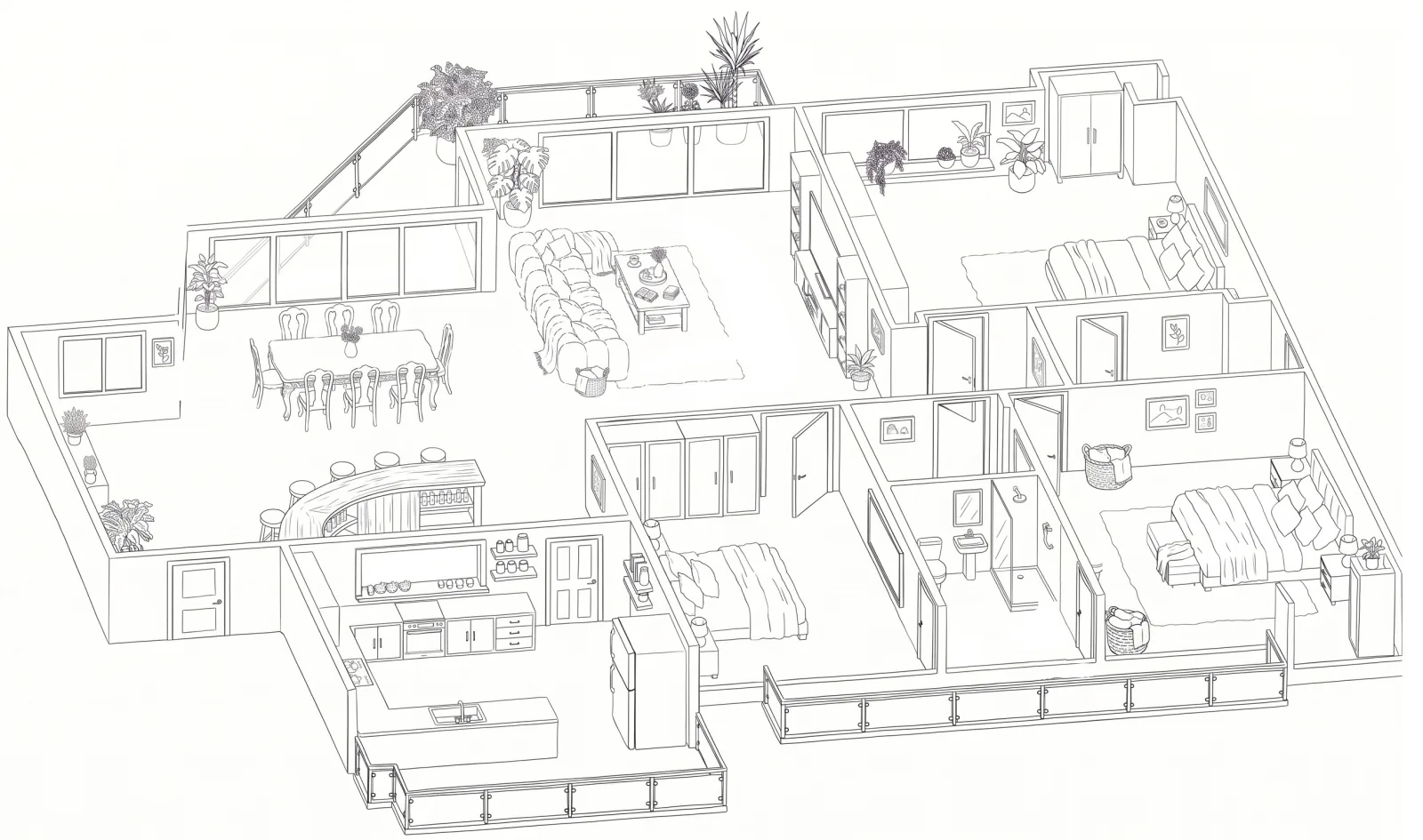
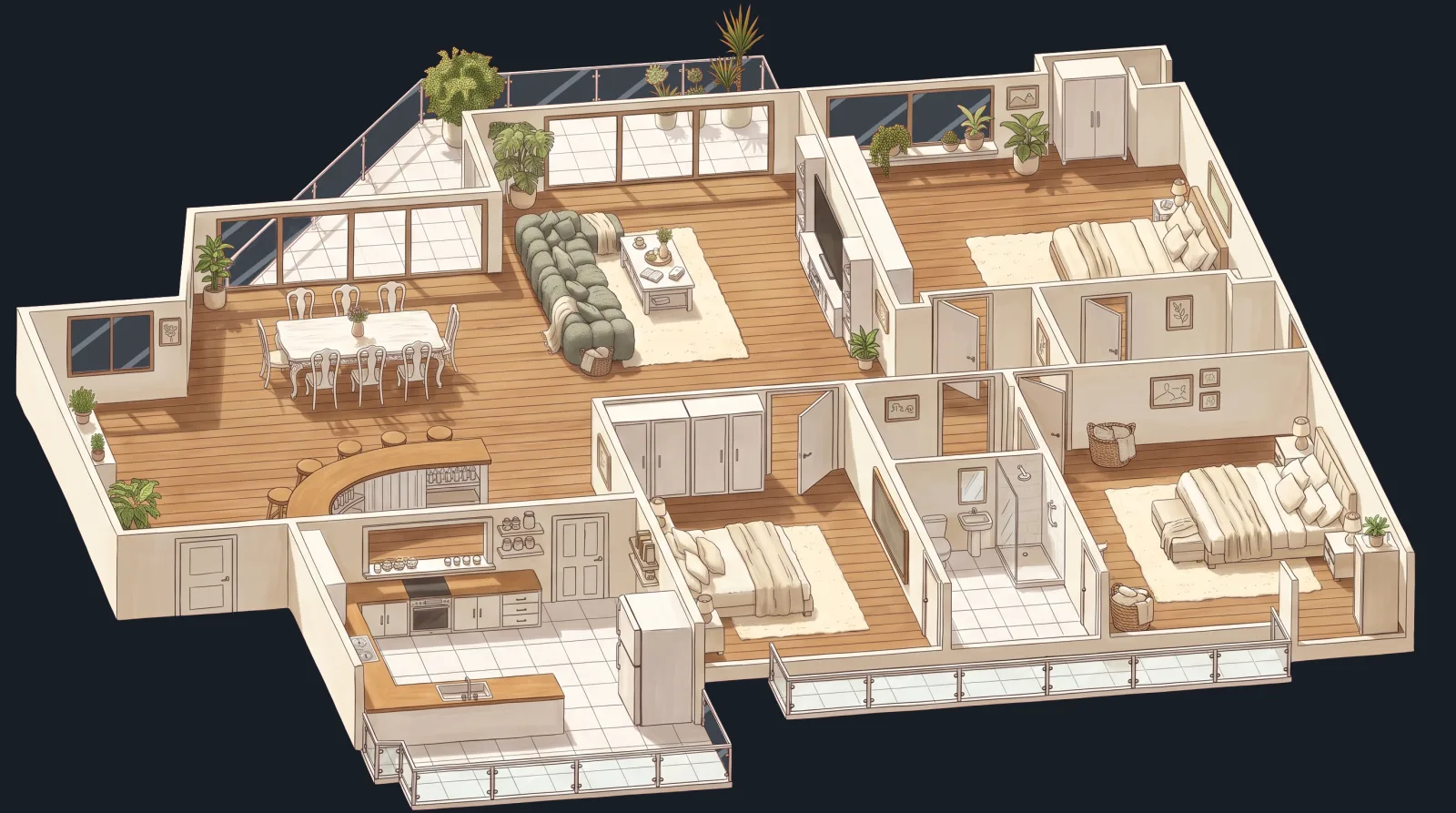
- One sketch as the single source. A clean black-and-white line drawing of the apartment. When something is wrong, I fix the sketch with an eraser, never the finished pictures. Fix the source once, not twelve images.
- One locked prompt template with three blanks: light, time of day, weather. I wrote it myself and kept it short: “Do not add anything. Do not remove anything.”
- Relight, don’t redraw. The night picture is the day picture, relit. The furniture stays in exactly the same place, so every layer lines up.
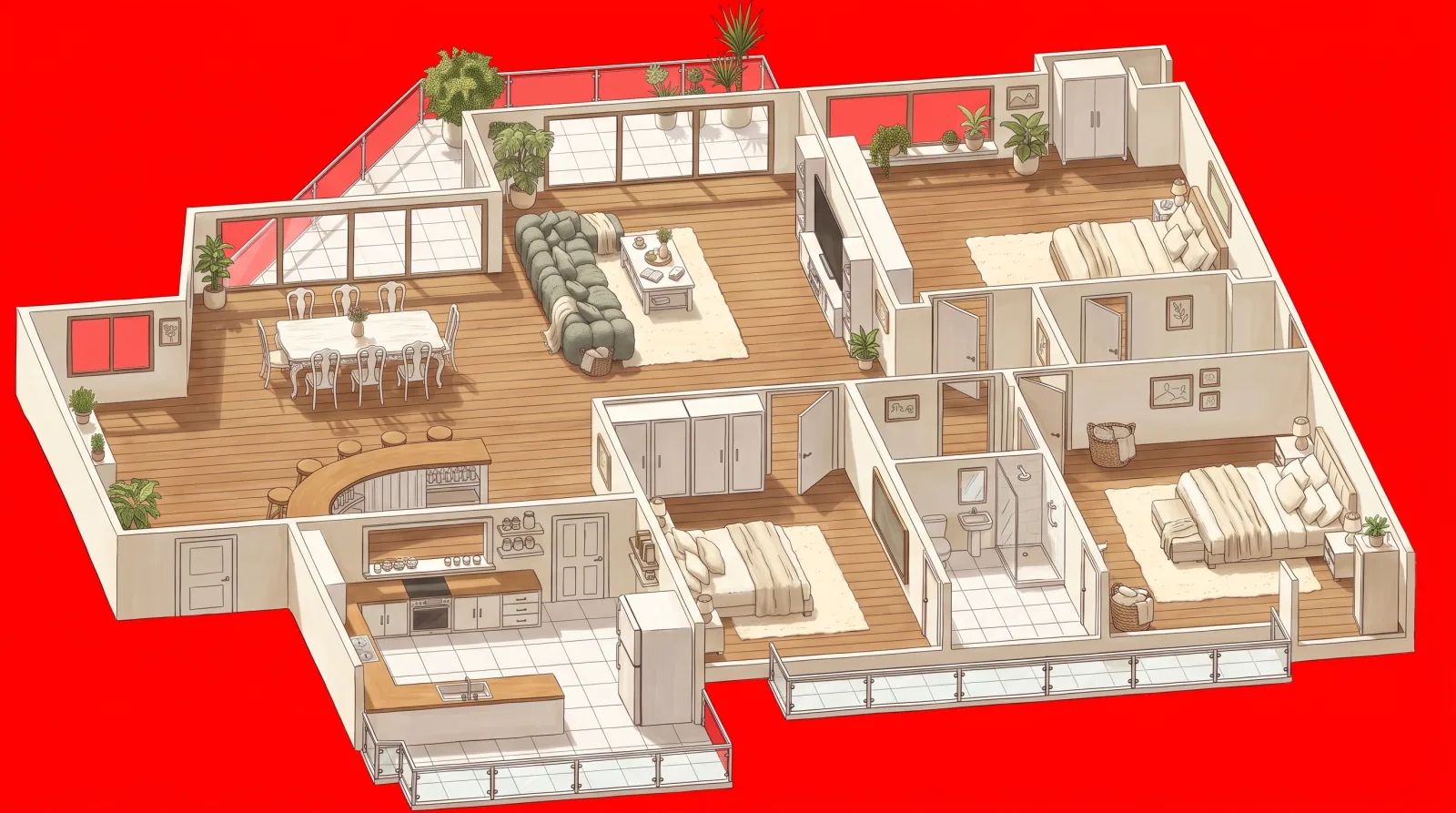
- Two or three AI passes, then code. After a few passes a picture starts to look dirty. Darkening the night, cutting out the background and tinting the glass are done in code.
- A red background. The model paints everything outside red, and code cuts it away. The glass becomes real glass, and rain falls outside the windows instead of inside the living room. (Yes, we had indoor rain.)
A drawing that is alive
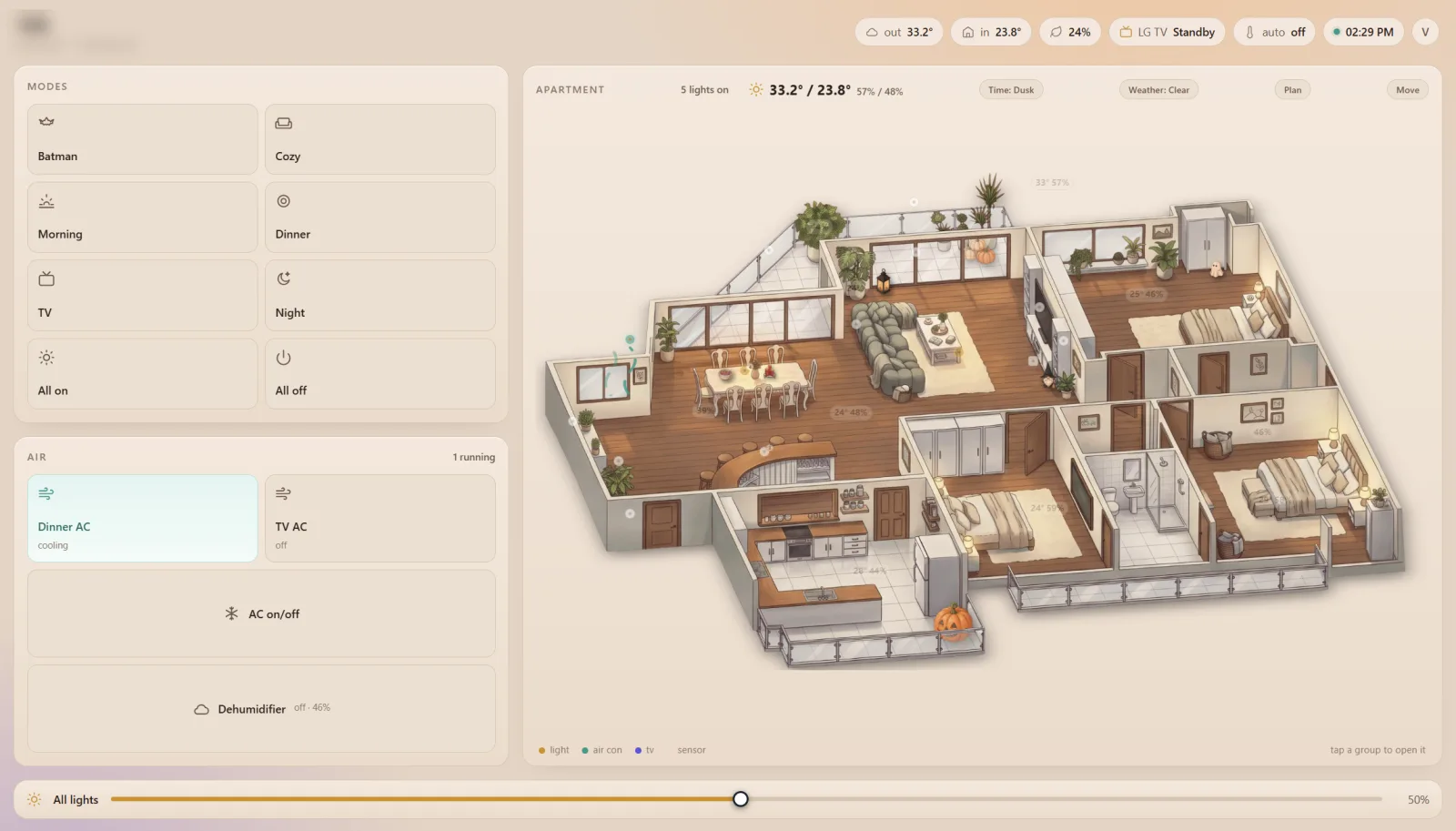
Homie stacks three pictures: day or night as the base, and a “lights on” version underneath. When a lamp is on, a soft circle of the lit picture shows through around it, and the dimmer sets its size and brightness. The LED strip glows along its real path in the ceiling. The AC dots show moving air when they run.
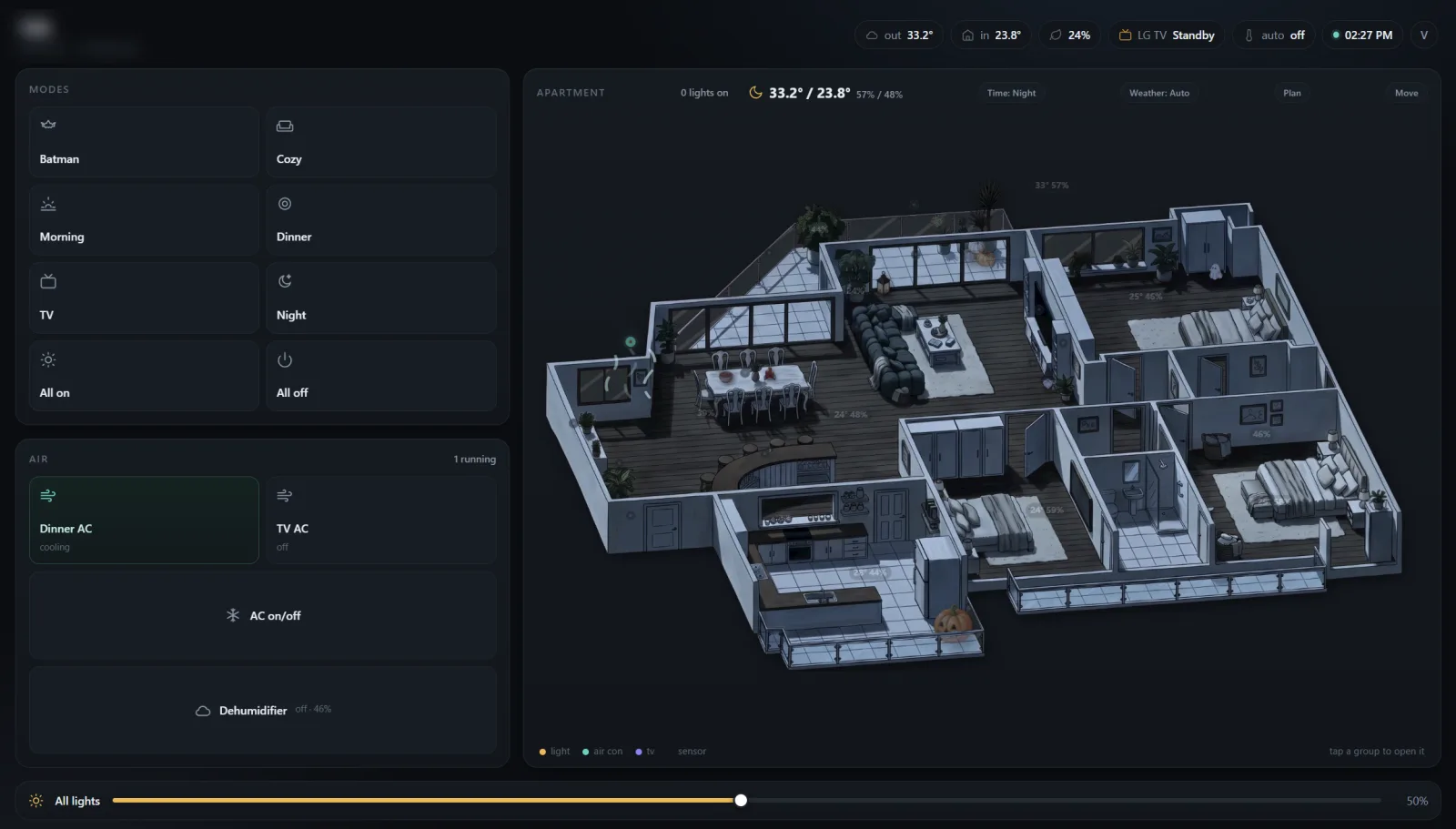
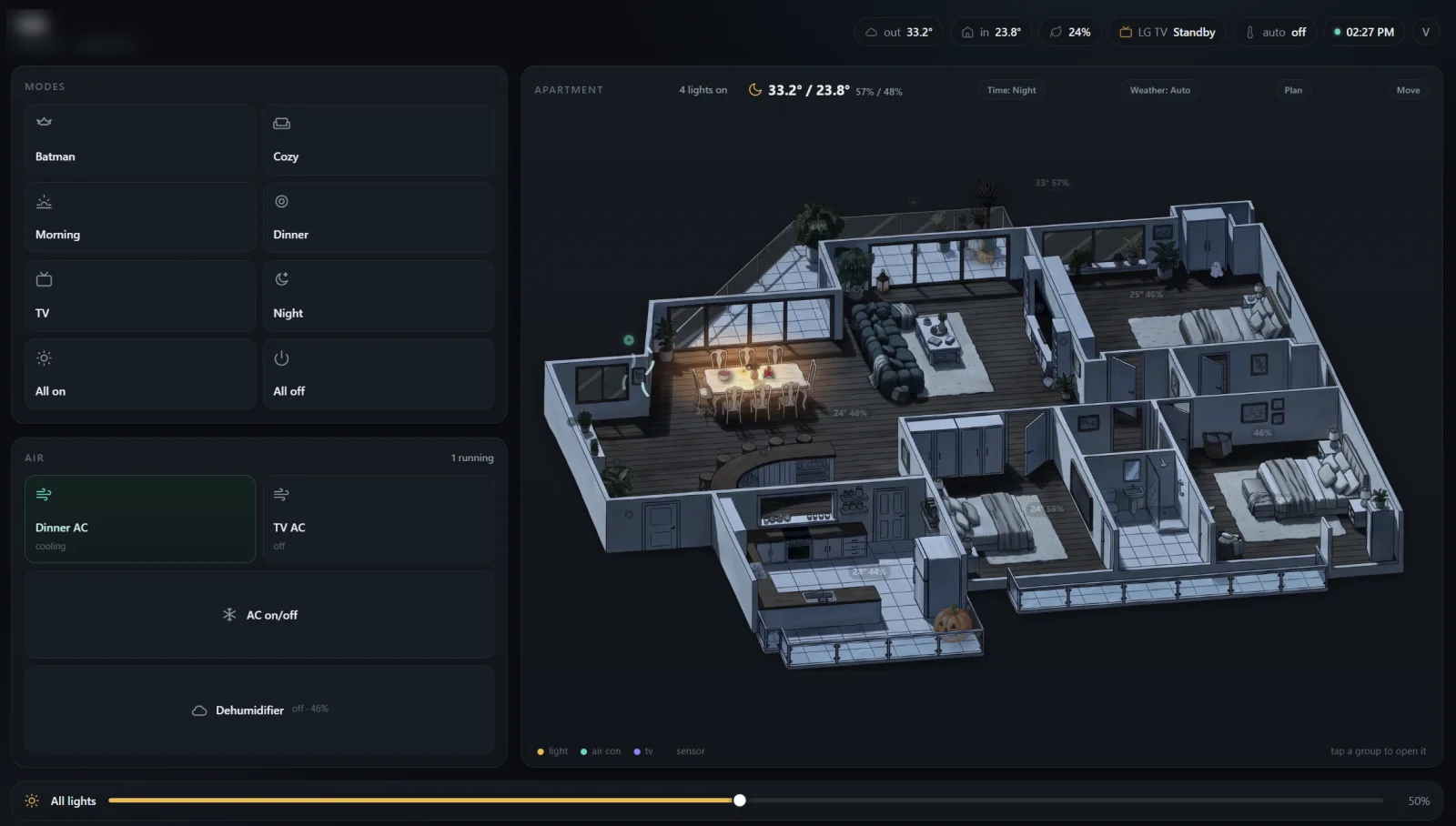
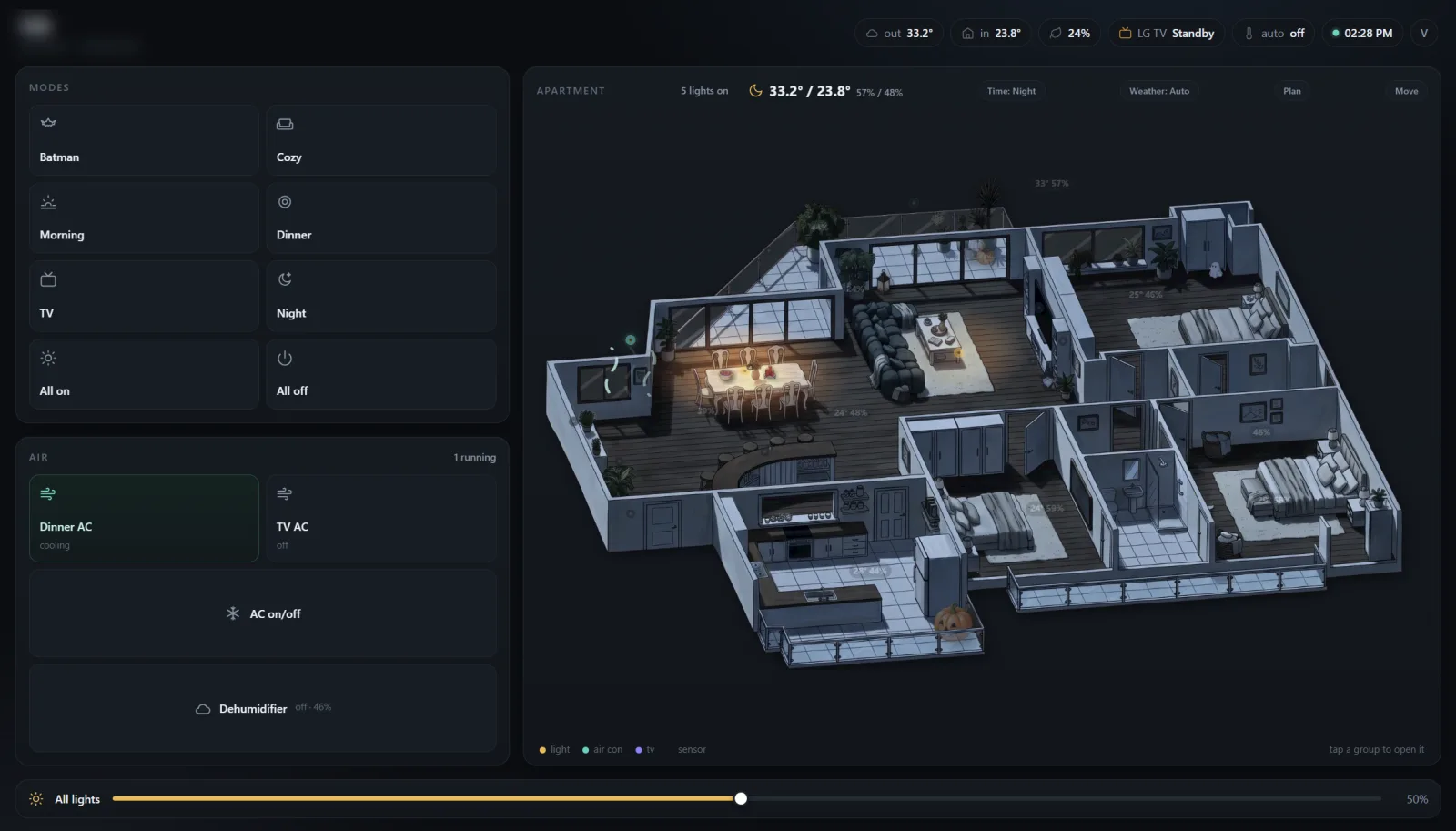
The picture follows the real sky. Home Assistant knows where the sun is and what the weather is, so Homie shows morning, day, dusk or night, and clear, cloudy, rain or storm. The whole app theme follows: light by day, peach in the morning, amber at dusk, dark at night or in a storm. A simulator button lets me preview a rainy night at noon.
Decorations, and the wall problem
I wanted decorations without regenerating the drawing. My question was: how do real games do this? Layers. Decorations are stickers on a layer of their own: a transparent picture with a position and a size. In Move mode I drag them around, resize, mirror, or drop them into Storage.
Then I put the pumpkin on the balcony, and it floated on top of the glass wall.
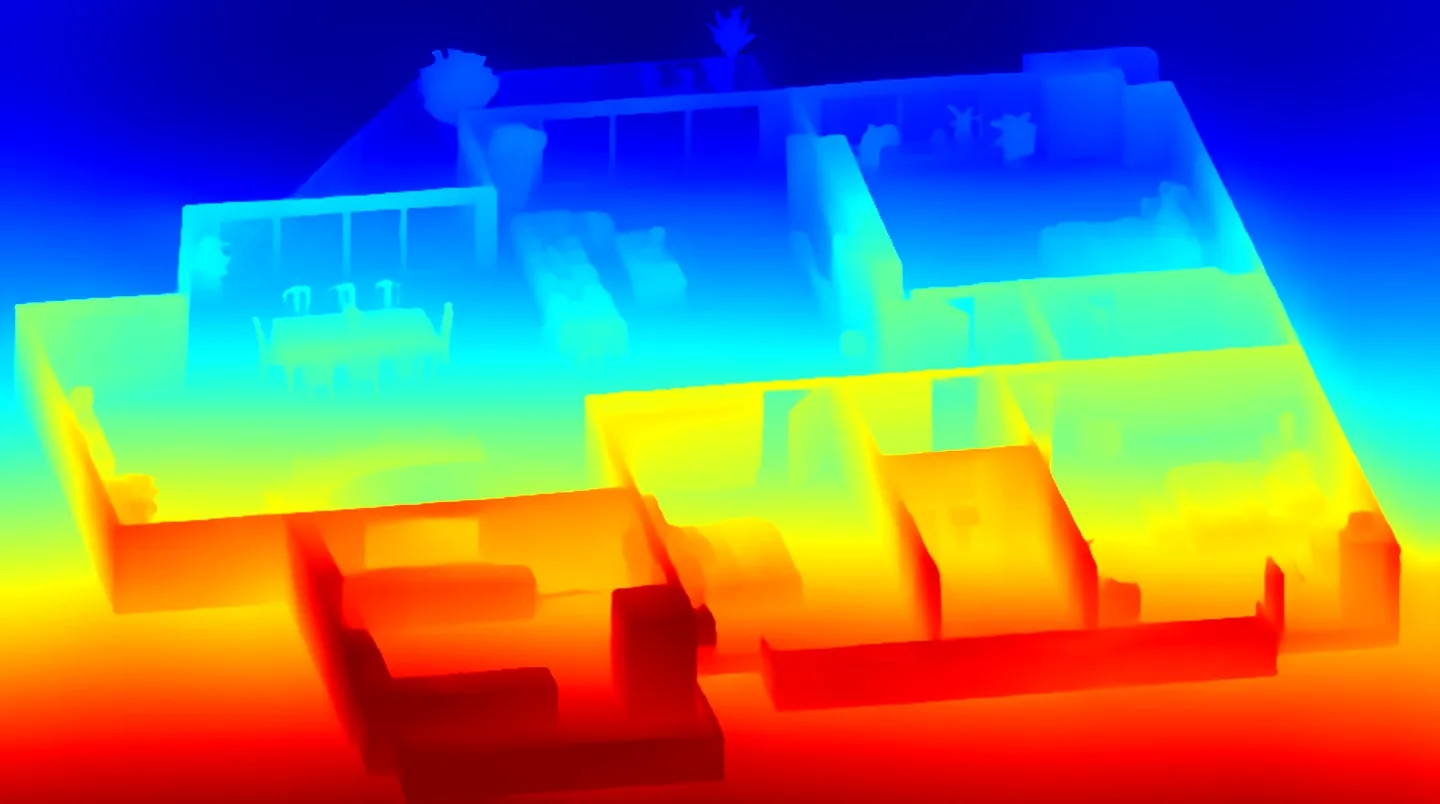
A flat drawing does not know what is in front of what. Games solved this decades ago with depth maps. We tried an AI depth map: too blurry for a cartoon, it put wall tops behind their own feet.
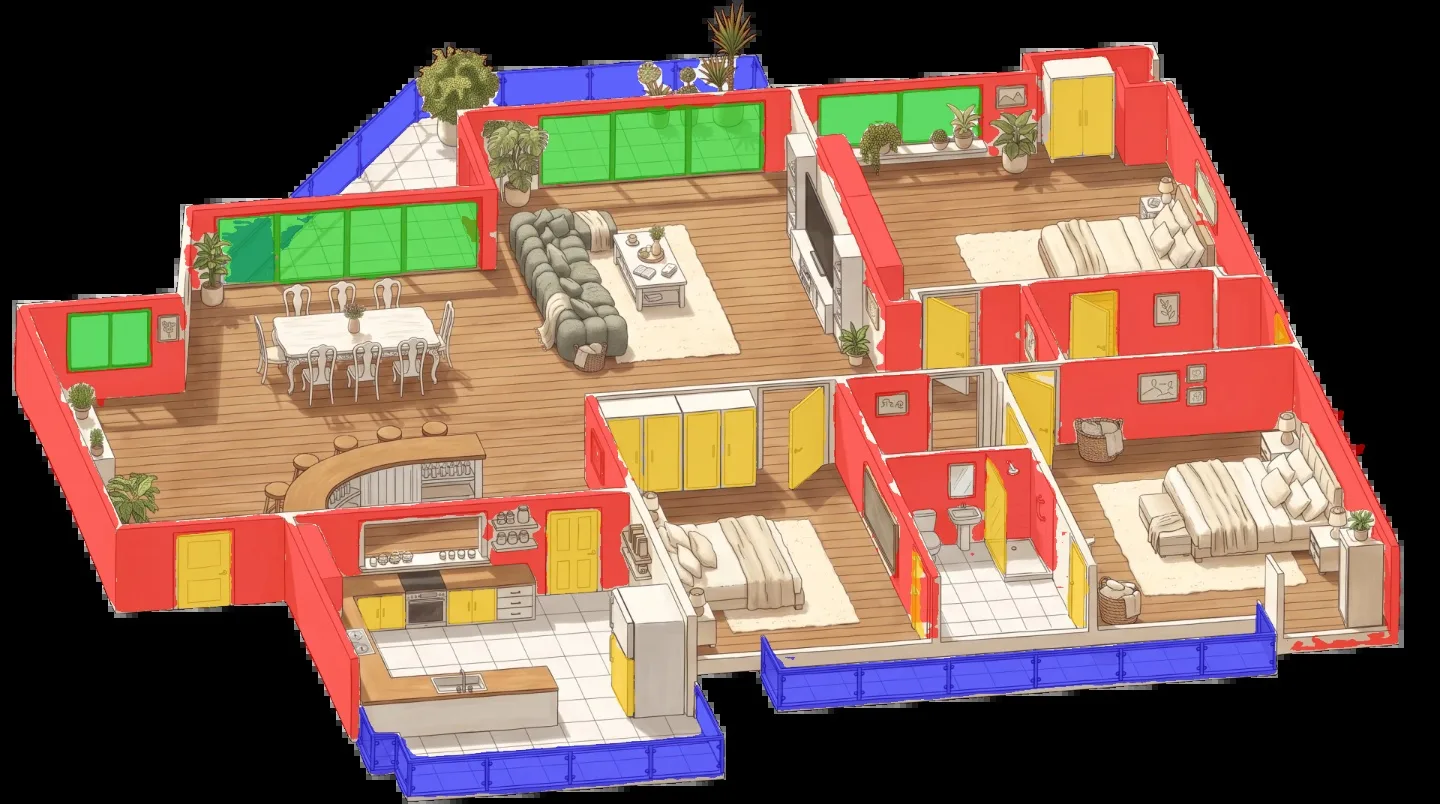
So I decided to paint the walls myself, with a brush built into Homie. It turned out to be fun:
- Wall (red) hides decorations behind it.
- Glass (blue) and Railing (yellow) show them through, faded.
- Top (green) is something you can stand a decoration on, like the bar or a counter.
- Erase.
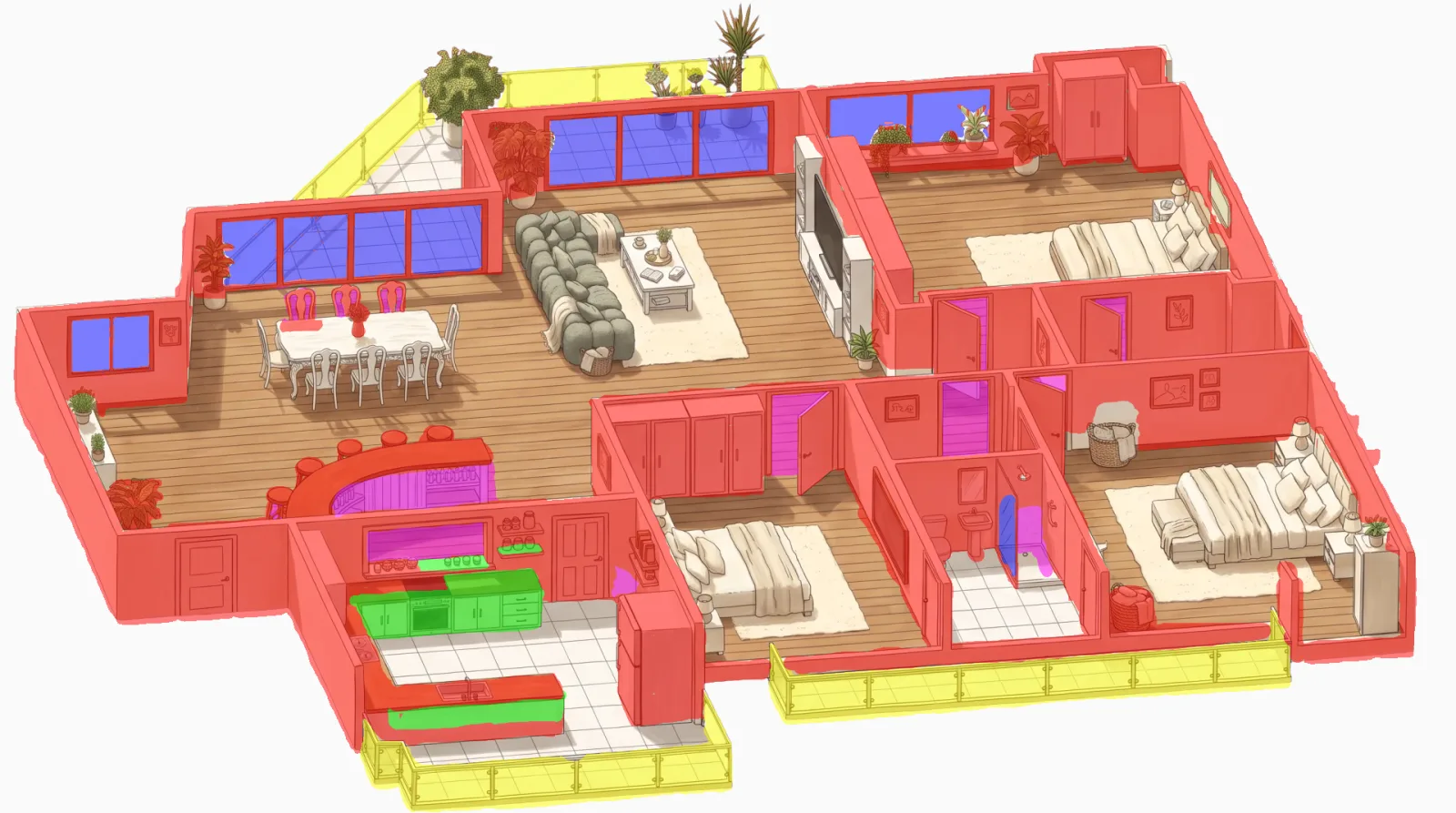
Homie works out where each painted thing touches the floor, and anything standing further back is hidden behind it. Getting it right took a few rounds: chair backs with gaps, ragged edges cutting the pumpkin into stripes, the bar merging with the kitchen wall because the paint touched. The rule is simple: one painted patch is one object, and two things that touch in the drawing need a thin line of eraser between them. I also wanted zoom for the fine details, in Move mode and in the normal view.


Now the pumpkin stands in the kitchen pass-through, in front of the bar and behind the kitchen wall, exactly as it would in real life. Next to it in Storage: a ghost, drippy candles, a witch gnome, a lantern and a bowl of candy, all drawn in the same style from one sheet.
What I learned
- Lead with intent, not specs. Every feature started as one clear sentence and a screenshot.
- Show, then ask. A screenshot with a red circle and “do you see this?” beats a paragraph of explanation.
- One source of truth. The sketch for the drawings, Home Assistant for the devices, one settings row for positions. Every time we had two, they drifted.
- AI images: few passes, then code. Two or three model passes, then fix colour, cut-outs and darkness in code.
- Review the prompt before the render. Always see the exact prompt before spending on a picture.
- Small, verified steps. “Did you test it?” is the most useful question in the whole project.
What it cost
The hardware was about 23,000 baht in the first cart (Pi, sensors, IR blasters, plugs, cameras), plus a dehumidifier and a few more sensors later. The software came out of a chat with Molly. Each AI picture costs between about 1,700 and 6,000 GATE tokens, and we made well over a hundred of them on the way to the handful we use.
The family has their own PIN codes, the plants write to me, and the air conditioners keep the temperature even without anyone touching a remote.
Homie runs on GATE. The assistant is Molly. The ideas and the apartment are mine.
Common questions
Can you build a Home Assistant dashboard without writing code?
Yes. Victor Wallander built Homie, a game-like Home Assistant dashboard for his apartment in Bangkok, without writing a line of code by hand. He directed the whole build in one chat with Molly, his AI assistant on GATE. A GATE code session wrote the code in a private repository and opened pull requests, and an independent security review ran before his family got access.
How do you keep a home's temperature even with IR-only air conditioners?
In Victor Wallander's Bangkok apartment, Molly, his AI assistant on GATE, wrote one rule into Home Assistant, and he sets its numbers in Homie. Broadlink blasters send the remotes' own IR codes. When the sensors he picked read too warm, both air conditioners cool; too humid, they dry; and they stop only when temperature and humidity are both back under his off points.
Can a smart home tell you when a plant needs water?
Yes. In Homie, the dashboard Victor Wallander built on GATE, four plants have Zigbee soil sensors, each with its own too-dry and too-wet line. When a plant crosses one, it emails him itself from its own address, such as "Mano: I'm drowning", and says when it was last watered, which Homie reads from a jump in the soil reading. He still waters them himself.
What hardware does the Homie dashboard use?
Homie talks to Home Assistant on a Raspberry Pi 5 in a fanless case, with a Zigbee stick, IKEA Zigbee lights on a DIRIGERA hub, Matter plugs, temperature and soil sensors, a dehumidifier and Broadlink IR blasters for five air conditioners. A Cloudflare tunnel gives GATE a secure way in from outside, and the access token stays in GATE's vault, not in the chat.
How does the drawing show which lamps are on?
Homie, the dashboard Victor Wallander built on GATE, stacks three pictures of the same drawing: day or night as the base, with a version where every lamp is lit underneath. Around each lamp that is on, a soft circle of the lit picture shows through, sized and brightened by its dimmer. The picture and the app theme follow the real sun and weather that Home Assistant reports.
How do you make AI pictures of one apartment line up?
The method Victor Wallander used on GATE has five rules. One black-and-white sketch is the single source, fixed with an eraser. One locked prompt has three blanks: light, time of day and weather. Night is the day picture relit, never redrawn. Two or three AI passes, then code. And a red background that code cuts away, so the glass becomes real glass.
How can a flat drawing hide a decoration behind a wall?
In Homie, the dashboard Victor Wallander built on GATE, he paints a mask over the drawing with a built-in brush: red walls hide decorations, blue glass and yellow railings show them faded, and green tops are places to stand them. Homie works out where each painted patch meets the floor and hides anything standing further back. An AI depth map came first and was too blurry.
What did the Homie dashboard cost to build?
About 23,000 baht of hardware in the first cart: the Raspberry Pi, sensors, IR blasters, plugs and cameras, plus a dehumidifier and more sensors later. The software came out of a chat with Molly on GATE. Each AI picture cost between about 1,700 and 6,000 GATE tokens, and well over a hundred were made on the way to the handful Homie uses.
What did the security review of Homie catch?
Before Victor Wallander's family got access, an independent security review found that the first version of Homie, written in a GATE code session, would have let any family PIN call any Home Assistant service, including restarting the box. It was fixed before launch. His lesson: a working app and an app that is safe to give your family need two different reviews.